Showing posts with label bauer-power. Show all posts

Jul 6, 2009

Bauer-Power Episode 11

I hope you all had a great Independence day weekend! You know I did! Fortunately for me, my company gave use a three day weekend, and I took full advantage of it!

On Friday the 3rd, Sundance and I got together to do Episode 11 of Bauer-Power. In this episode we discuss epic geek battles. In that segment we try to determine who would win between the following:


Who do you think would win? Let us know your picks and the reasons why in the comments!

After we discuss that, we decided to Go Office Space on an Acer! As you all know, I don’t like Acer very much. Well, we got our hands on an Acer LCD monitor and decided to beat the living hell out of it!

When we were done taking out our aggressions on the poor defenseless monitor, we decided to introduce you to my new short URL service, NinjURL.us! (More on that tomorrow!)

Without further ado, here is Episode 11 of Bauer-Power! This time filmed with my Kodak Zi6!

So what did you think? Any recommendations, suggestions, hate mail? Hit us up in the comments!

May 29, 2009

And the winner is...

Not a bad turnout for my second contest ever here at Bauer-Power! My first sucked royally. I did an Entrecard contest and only had 3 entries. This time I had 43! Perhaps the next contest will have way more than that!

Anyway, I am sure you are wondering who won, well your wait is over! Using this random number generator I found the winner for the contest! Congratulations goes to:

@fictoris


You have until Monday at 2PM Pacific time to DM me with your shipping address, and which T-Shirt and size you want. Click here and take your pick: (Bauer-Power Gear T-Shirts)

Thanks to all who played! Stay tuned for the next contest where you can win a used HP D530 SFF with Bauer-Puntu Linux pre-installed!

Technorati Tags: , ,

Contest Ends Today at 2PM PDT!

If you have not already done so, get your entry in to win a free T-Shirt from Bauer-Power Gear! If you haven't heard about it, I started a contest at the beginning of the month. Check it out: (http://contest.bauer-power.net)

Entry is simple, follow me on Twitter, and retweet the message I mentioned in that post. If you want an additional entry, subscribe to my RSS feed, and post a link in the comments with a screen shot of Bauer-Power in your RSS reader!

Here are some pictures of some of the T-Shirts you could win:

esxi

Google

HardDrive

reboot

linux

For a full selection of T-Shirts click here: (Bauer-Power T-Shirts)

You have until 1:00PM PDT to get your entries in! I will be announcing the winner at 2:00PM PDT today!

Technorati Tags: , , ,

May 27, 2009

Bauer-Power Episode 10

Can you believe it? Sundance and I have finally made it to episode 10! I bet you wished we would have quit after episode 1, but oh no, we kept going!

In this episode we address some criticism and suggestions about our previous episodes, and also try to draw comparisons between all the different episodes up until now. We also show you where you can create your own awesome free soundboards, as well as cool geeky cube figures to spruce up your office. We also try to take you into a typical day at the help desk and finally discuss the removal of the shout feature from digg.com. Here it is, Episode 10!


As usual, you can view our previous episodes on our Blip.tv channel here: (Bauer-Power TV)

You can add us to iTune here: (Subscribe via iTunes)

I know in the video we mention not finding a cool video editor, but over the weekend I obtained a copy of Adobe Premier Elements 7. Let me tell you what, this bad boy has all of the ease of use of Windows Movie Maker, but way more power! It has multiple audio and video layers, more special effects and transitions, and is all around a way better video editor. I can't wait until we have a better camera, because that with this new software will make one hell of a show! The only thing we will be missing is decent writing!

So how did you like this episode? Got any more CONSTRUCTIVE suggestions or tips? Hit us up in the comments!

May 18, 2009

Bauer-Power Episode 9

That is right! Two in a mutha friggin' row! Sundance and I had such a good experience getting up at the crack of dawn to head on into the office a little early to shoot an episode, we decided to do it again! I am thinking this may turn into a weekly thing :-)

This episode is AWESOME if I do say so myself! In this episode I share with all of you my new Hackintosh! That's right I took my new Dell Mini 9 and installed OSX on it! After we talk about that, Sundance gives us his impressions of Windows 7, then I review "Deadliest Warrior" which is one of the geekiest/coolest shows on television, and finally Sundance tells us where to get free web development programming! Here it is, Episode 9!


You can catch our previous episodes on our Blip.tv channel here: (Bauer-Power on Blip)

Got an iPod or iPhone? Add our videos to iTunes here: (Subscribe via iTunes)

So what did you think? We really do want to hear your thoughts and ideas about the show. What kind of stuff do you want to see? Hit us up in the comments with your feedback!

May 11, 2009

Bauer-Power Episode 8

Happy Monday readers! I have got something to get your week started out right. Something to jump-start your weekly craving for all things geeky! Yes, Sundance and I got together last Friday extra early to film Episode 8 of Bauer-Power!

In this episode we return to using my little Kodak MX1063 which sucks, but at least it is better than the Logitech webcam we used in episode 7. One of these days I will get an HD camera, but it won't be for a while. I just bought a Dell Mini 9, and I'd like to pay that off before making another big purchase.

So back on track. With this new episode, my wife Mary makes an appearance by announcing the show, Sundance talks about our two front page stories on Digg, I talk about the Twitter contest I am running right now, Mr. EpicFail rants about work-at-home schemes, I introduce Bauer-Puntu 9.04, and Sundance introduces us to Tversity. Without further ado, here is episode 8!


If you want to watch episode 7 it is available on our Blip.tv channel here: (Bauer-Power TV)

If you want to watch our older episodes, you can catch them on our old Veoh channel here: (Veoh Channel)

How did you like this episode? What kind of stuff do you want to see in these shows? We want you feedback! Hit us up in the comments.

Technorati Tags: , , ,


Apr 24, 2009

Bauer-Power Episode 7 - (Sorry in Advance)

Alright, I know it has been a really, really long time since Sundance and I got together to do a video episode of Bauer-Power. A lot has happened since the last episode. For one, my wife and I just had a baby boy on the 30th of last month. You and I both know how irritable a pregnant lady can be... Well, some of you know that.

Also, I wasn't happy with the low end HD Camera I was using so I took it back. Then I had the damnedest time trying to find one I actually liked. I finally found one in the Canon FS100. It isn't HD, but at least it has a friggin' mic input which most digital cam corders don't have now.

Also, in the past few episodes Sundance and I got a little carried away trying to do chroma keying, and recording sound separately. It became an editing nightmare to do the chroma keying, then turn around and re-dub in the audio later. It would take me two or three FULL days to get all the editing done for the little bit of crap....err.... high quality video we finally produced.

Anyway, enough about that. I suppose you are wondering why I apologize in the title. Well, like I mentioned above, I took back my HD camera and don't have a camera, so Sundance and I decided to try out filming an entire episode using nothing more than a $77 Logitech web cam. The actual web cam is a Logitech Quickcam Pro 9000. I have to tell you, and you will see, that this camera is great for Skype, but lousy for IPTV shows. The sound barely follows out lips, we are blury when we move, and the resolution rather sucks. Besides that, everything else is great!

Anyway, in the episode we talk about a number of things we have been working on, played with, or have noticed. These things range from Ubuntu 9.04's release yesterday, to Openfire Jabber servers, to WII Homebrew hacks and other stuff. Without further ado, here is episode 7:


All our old episodes can be viewed on our Veoh channel here : (Bauer-Power on Veoh)

Going forward though, all new episodes will be available on our Blip.tv channel here:
http://video.Bauer-Power.net
The reason for the change is Veoh now requires everyone to install the Veoh player in order to watch full episodes. Any video's embedded on other sites only show 5 minute clips. That really doesn't jive with what we use it for, so we made the switch to Blip.tv. I posted a video explanation here as well.

Anyway, back to the video... I know what you are saying, "Don't be so hard on yourselves, it was actually pretty friggin' awesome." To that I say, thanks, but I know you are just flattering us :-P

So what did you like about this episode? What didn't you like? Is there some stuff in particular you would like to see, or hear about in these episodes? We really want your feedback in the comments.

P.S. Next episode, we will use a REAL camera. I promise!


Feb 25, 2009

Bauer-Power Episode 6

Yes, finally Sundance and I were able to get back together for another awesome video episode of Bauer-Power! In this episode, Sundance and I decided to do the show "Weekend Update" style, and do it in a funny news sort of format. We hope you like it. Comedy is hard to write!


We decided to give you all a run down in the past month's top stories, with a tad of geeky humor. In case you have trouble figuring out where the punch lines are, we inserted a cheesy laugh track to help you along ;-)

Here is Episode 6 of Bauer-Power!


You can check out our previous episodes of Bauer-Power on our Veoh Channel here: (Bauer-Power Veoh Channel)

If you don't get Veoh in your country, you can catch the Youtube version here: (Bauer-Power Episode 6 on Youtube)

If you wanted to read more about the stories we discussed, here are the links to our sources:


I do want to say that we had some troubles with audio, and chroma keying this go around. Our biggest problem was that we didn't realize how absurdly shiny Sundance's table top was, and how much green it would reflect. We hope to fix that in future episodes. We may even ditch the chroma keying as it is a royal pain in the arse.

Cheesyness aside, how did you like this one? Got any suggestions? Hit us up in the comments!

Technorati Tags: , , , , , , , , ,

Feb 2, 2009

Bauer-Power is NOT Dangerous!

This one kind of gave me a laugh. I may have taken it more seriously if I felt it would cost me some traffic, but I am not too worried about it. Mainly because I just about get zero traffic from this particular search engine anyway.

I am talking about Yahoo! I had an old Navy buddy shoot me an email. He told me that he did a search for Bauer-Power on Yahoo. Of course, Bauer-Power showed up as one of the top on the list. That was expected. What wasn't expected was the fact that Yahoo thinks Bauer-Power contains dangerous downloads!

Check out this screen shot!


I think I would be worried about it if I got a significant amount of traffic from Yahoo, but I don't! No, me, like most tech savvy folks do our searches on Google. True, Google had a similar issue Saturday, but they got that resolved. This one, doesn't seem to be going away any time soon.

I don't know, maybe I should look at it like a badge of honor! What do you think? How would you feel if a major search engine told people you were dangerous? Let me know in the comments.

Jan 20, 2009

Bauer-Power Episode 5

Hey Bauer-Power readers! As promised from my video post last week, here is Episode 5 of Bauer-Power!

We are a little early with this one. That is mainly because my wife was out of town so it gave Sundance and I an opportunity to get together to do some shooting. And shooting we did! Not only did we get a standard episode in, we were also able to shoot an entirely new opening sequence! One that is meant to be action packed, and completely ridiculous :-)

The opening sequence is rather long. In future episodes, I will be shortening it, so drink it in before we cut out all of the gratuitous action!

In this episode Sundance and I list our top ten list of video editors, being as how we are starting to get into the whole IPTV game.

So grab some popcorn, some beer and get ready to get your geek on!


- Link to video for feed readers -

If you missed, our list of editors because you were so deeply engrossed in the awesomeness, they were:


Check out a couple of bloopers and outtakes from the filming here: (Episode 5 Bloopers)

If you are curious where the running sequence was filmed, it was filmed at the Neuroscience Institute in La Jolla, CA: (www.nsi.edu)

How did you like this episode? What would you like to see differently? What video editors do you use? Let us know in the comments, or shoot me an IM via Digsby on the right side of the page.

For other episodes of Bauer-Power, visit our Veoh Channel at http://video.Bauer-Power.net were all episodes are available as a Podcast!

Jan 19, 2009

Another Blooper from Episode 5 of Bauer-Power

In this video, we just finished filming a clip for our upcoming Bauer-Power video. At this point Sundance is a drunken fool, and is all bubbly and happy go lucky. So much so in fact that he forgot to stop recording.

Lucky for you he did! Enjoy another blooper from Sundance!


Jan 17, 2009

Bauer-Power Episode 5 Blooper

Sundance and I filmed episode 5 of Bauer-Power today as well as a newer exciting opening sequence. We generally were able to film everything in one take with the exception of the following little gem that I am about to share with all of you.

You see, Sundance isn't the best runner in the world, nor is he the most athletic. That is okay, as he readily admits it. In the following scene he is supposed to run and jump off a flower bed to get a freeze frame action shot for the opening credits. His jump was good, but he just couldn't stick the landing. Enjoy!

Nov 24, 2008

Bauer-Power Episode 2

Go ahead.... Pinch yourself. You know you want to do it, because episode 2 of Bauer-Power has just been released! That's right Sundance and I got together this weekend to shoot another quick episode of Bauer-Power! No, you are not dreaming.

This time we decided to get out of my dark apartment and escape to the great outdoors to a local park close to my place that also happens to have a little amphitheater in it. That's where we shot it, sitting on the stage of the amphitheater.

Looking back on it, that may not have been the best place as Sundance and I didn't know what to do with our hands, and there were a lot of sounds and distractions going on. It could have been worse though...

Anyhoo, if you are watching it and I look a little nervous, or sound weird, that is because of the energy drinks we were drinking. Sundance recommended the one I was drinking (Spike Shooter), and I didn't expect it to be so damned strong. The caffeine hit me pretty hard during the shoot.

Enough about all that though. In this episode we keep it short this time and focus on one topic....

UBUNTU!

We hope you like it!


What did you think? Was the first one better? Was this one better? What would you like to have seen more of? We want to hear your feedback in the comments.

Nov 9, 2008

Scripting a Defrag

Anybody who is anybody knows that the built in Windows defrag utility stinks. It is very hard to schedule defrag and have it work correctly. The problem with that is that if you don't automate it, it will likely never get done, then you will start to see a lag in performance.

For those of you not "in the know", the reason defragging your hard drive is a good idea is because of the way Windows writes data to the hard drive. Windows doesn't write your word document in one continuous chunk on the hard drive. It breaks it up and puts the pieces where there is open space all over your drive. Over time, these fragments get out of control, and it takes the computer longer to find all of the pieces. It's kind of like your desk at work, with all sorts of papers strewn about. The defrag utility moves all of the pieces so they are back together again.

Now back to automation. There are lots of third part utilities out there for scheduling a defrag, and most of them cost money. The one I am going to talk about is a command line utility called DIRMS. Now, like some freeware products, DIRMS is no longer free, and comes only as trial ware. Once again, Bauer-Power to the rescue! I have the old free version available HERE. I have also included the script I wrote that will let you execute it without having to know much about running things from the command line. Just save it to the root of your C: drive (If you have a different letter, edit the batch file using notepad to use that letter).

The coolest part, is that since it is so easy to write a batch script for running it, it is even easier to automate. You can set the batch script to run as a scheduled task in windows. If you don't already know how to do that, click on Start> All Programs> Accessories> system Tools> Scheduled Tasks> Click on the Add Scheduled Task icon and follow the wizard. When it prompts you for which file to run, browse to the batch file, select it, and click OK.

I use it all the time, and it works great. I recommend setting it for a time when you aren't going to be using the computer, like sometime between midnight and when you wakeup (Yes, your computer has to be on to run it! I don't know how many times I have had users ask me if it okay to turn their computers off when they go home when I have set something to run after they leave. If you turn off your computer the scheduled task will not run. Simple as that!)

Once again, you can download it HERE.

Oct 24, 2008

Video Episode 1 of Bauer-Power

Yes, we have finally did it! Sundance and I have gotten together to collaborate on creating a video segment to the blog!

In this episode we talk about the top 10 hits to the blog for the last 30 days, as well as totally drink a lot of beer and bullshit a lot. We had a lot of fun making it, and we hope you enjoy it.

Of course we are on a budget, so the video quality isn't as good as it could be, but hey! It goes along with the theme of the blog which is free software, and not spending money if you don't have to.

We are hoping to start doing this at least once a month, and perhaps more frequently if this catches on!

Without further ado, here is Episode 1 of Bauer-Power:


I think it is important to note that we totally skipped mentioning the Bauer-Power Ubuntu Stickers. That was a total accident, however it was 1:00am when we realized it and didn't feel the urgency to go back and re-shoot.

That being said, how did you like it? What kind of stuff do you want to see in a video segment? Let us know in the comments!

Oct 6, 2008

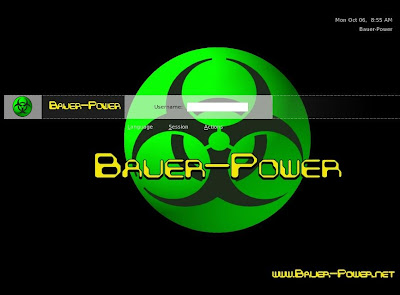
Get it while the gettin' is good: Bauer-Power GDM Theme!

Hey guys! I have been busily working on an upcoming article on creating your own custom live cd. In the process I decided to create my own custom GDM login screen for Ubuntu (Or any other distro that uses GDM).

I went ahead and made it available to everyone under a GPL. If you are interested I uploaded it to Gnome-Look.org.

Here is the direct link: (Bauer-Power GDM)

Here is a screenshot:

Bauer-Power GDM Theme Ubuntu

Let me know what you think! This is my first try at creating GDM themes, so be gentle.

Oct 4, 2008

Keep "The Man" out of your Virtual Memory

I’ve mentioned different ways that “the man” can gain evidence from your computer, and ways to protect yourself. One way I mentioned was recovering deleted files from your hard drive, for that I suggested a couple of free hard drive secure wiping solutions. Another method of protection I suggested was full hard drive encryption, but if they have a warrant, you will be forced to give up your password so they can gain access.


A method that “the man”, and hackers for that matter, use that I didn’t mention was recovering data from your computer’s virtual memory. Virtual memory is a small area on the hard drive that the computer uses to temporarily place item it has in memory when it isn’t in use in order to make room for programs that are being used. When you shut down your computer, the data stays there until the next time you use it. Likewise, when your computer goes into hibernate mode, all data in memory gets dumped there while your computer turns off. That way when you turn it back on, everything opens right where you left it.


agentt smithTo help protect against this, you can clear your virtual memory at shutdown. This isn’t a fool proof method, and it may even increase the time it takes to shut your computer down, but it is better than a sharp stick in the eye. I actually recommend this with the use of the other methods I already posted about.


I don’t know how to do this in Linux (If you know, please leave a comment on how to do it, or where we can find directions), but in Windows it is a simple registry edit. Remember that before editing the registry; always make a backup of it first! Also, never mess with the registry unless you know what you are doing.


1) In Windows, click on Start > Run, then type in regedit (or regedt32) and click OK

2) Go to: HKEY_LOCAL_MACHINE\SYSTEM\CurrentControlSet\Control\Session Manager\Memory Management

3) In the right pane, you should see a value called ClearPageFileAtShutdown, right click on it and select modify.

4) Change the data value from 0 to 1

5) If that option isn’t there, you can create it by right clicking in the right pane, and selecting New DWORD value, name it ClearPageFileAtShutdown and set the value to 1.

6) Reboot your computer to let the changes take effect.


Both “the man” and hackers have many tools at their disposal to parse through your virtual memory. Use this, along with the other methods to keep your data secure.

Sep 29, 2008

Definition of irony: I blogged about Clickjacking, now I'm a victim

For you avid readers, and visitors to Bauer-Power. you may have noticed that since I blogged about how to mitigate clickjacking by using the No-Script Firefox plugin, that there are now weird popups if you visit Bauer-Power.

I assure you that I have not added a pop-up advertising to my list of sponsors. No, this happens after you visit my site for the first time since it was compromised. A cookie drops on your computer showing that you have visited. If you click ANYWHERE on the site, even off on the sides, a new page will pop-up taking you to sweetim.com or some other nonesense.

One thing I am noticing is that the clickjacking opens up to 91.121.16.4:84, then redirects to www.sweetim.com. I highly recommend blocking both of those on your firewalls, and content filtering systems.

A quick Reverse DNS lookup reveals this:

91.121.16.4 resolves to "ns38720.ovh.net"
Top Level Domain: "ovh.net"
Country IP Address: FRANCE


I am working on resolving this issue ASAP. In the meantime, the best way to read Bauer-Power will be via RSS.

[EDIT] - Okay, I figured it out! If you have been reading up on Clickjacking, you know that it is primarily a vulnerability in Adobe Flash. The only Adobe Flash plugin I have added in a while was my Geovisits map. I removed it, and BAM! No more Clickjacking.

Lessons learned: Try to keep flash related plugins out until Adobe can patch flash, and the browsers can be patched as well.

Have anything to add? Hit me up in the comments.

Feb 10, 2008

Open Source Alternative to Quicken or Money

Tax season is upon us again, and I don’t know about you, but that kind of gets me thinking about my finances a bit. If you are like me, perhaps you are looking to find a better way to manage your finances, accounts and other items a little better. Maybe you just want to see where all of your dollars are going, or maybe you’re a small business owner looking to keep track of the books.


Whatever your reason, you may be in the market for some kind of accounting software. If you are like my wife, you probably thought about going out and getting something from the big dogs like Intuit’s Quicken, or Microsoft Money. Not this guy, I’m not going down the pay-ware super highway unless I am forced to at gun point.


money manager, free alternative to quickenI found an open source accounting program that has ports for Windows, and Linux, and of course, it is free. Money Manager Ex is the name of the software. It has a real basic interface, so you won’t get lost in all of the bells and whistles that you might find in their pay-ware counterparts.


Some of the things it can do are manage all of your bank accounts, your stocks, keep track of your assets, budgeting, and any repeating transactions you may have, along with a myriad of reporting tools. A full list of features can be found here.


If you have been looking to take back control of your finances, or just looking for a better way of doing it, then Money Manger Ex might just be the solution you have been looking for

Jan 30, 2008

Password Crackers

I have been getting a lot of hits from Google searchers looking for ways to crack passwords for many different things, mainly people’s online e-mail, though I’m sure they were looking to crack other things as well. I mean, lets face it, people are lazy and I will go out on a limb here and say that 90% of people use one password for everything. If you find their password for one thing, there is a greater possibility that they will use it for everything from online banking, to Paypal, to MySpace. The trick is to find that one password.


I wrote before about using a Keylogger to secretly find a password, but what if you don’t have time to wait for them to get on the computer and type away so you can read the log later? What if you need to gain access now? That is where you need to find a different method. Here is a list of password attacking programs that I picked up from SecurityForest.com:


leet, l337, 1337Please remember, that use of these items may be illegal to use in some states and in some countries, please check your local laws before using any of these programs. I cannot be held responsible for someone’s misuse of these programs!


John the Ripper (Windows, Linux, BSD): John the Ripper is a fast password cracker, currently available for many flavors of Unix (11 are officially supported, not counting different architectures), DOS, Win32, BeOS, and OpenVMS. Its primary purpose is to detect weak Unix passwords. It supports several crypt(3) password hash types which are most commonly found on various Unix flavors, as well as Kerberos AFS and Windows NT/2000/XP LM hashes. Several other hash types are added with contributed patches.


L0phtcrack (Windows): L0phtCrack attempts to crack Windows passwords from hashes which it can obtain (given proper access) from stand-alone Windows NT/2000 workstations, networked servers, primary domain controllers, or Active Directory. In some cases it can sniff the hashes off the wire. It also has numerous methods of generating password guesses (dictionary, brute force, etc).


Lepton’s Crack (Windows, Linux): It can perform a dictionary-based (wordlist) attack, as well as a brute-force (incremental) password scan, including enumeration of a regular expression (useful if you know something about the password). Currently the formats supported are: standard MD4 hash, standard MD5 hash, NT MD4/Unicode, Lotus Domino HTTP password (R4), SHA-1 and
LM (LAN Manager).


Cain and Abel (Windows): Cain & Abel is a free password recovery tool for Microsoft Operating Systems. It allows easy recovery of various kind of passwords by sniffing the network, cracking encrypted passwords using Dictionary & Brute-Force attacks, decoding scrambled passwords, revealing password boxes, uncovering cached passwords and analyzing routing protocols. It is also a great tool for arp spoofing and MITM attacks. Source code is not provided.


Creddump (Windows): The program follows the same methodology used by Todd Sabin in his PWDUMP2 program to decrypt credential files. It uses the "DLL injection" technique to run a thread in the same security context of the Local Security Authority Subsystem process. The thread's executable code must first be copied to the address space of LSASS process and this requires an account with the SeDebugPrivilege user right. By default only Administrators have this right. Once injected and executed, the thread will run with the same access privileges of the Local Security Authority Subsystem and will use the native undocumented LsaICryptUnprotectData API from LSASRV.DLL to decrypt the credentials file. The thread stores the output of this API in a temporary file named cred.txt located in the same directory of the program. Finally, user's credentials are dumped and put ont the screen. Credential Manager can store various kind of passwords, they can be saved as MultiByte or WideChar strings, security BLOBS and certificates too. The choice of the final encryption method is left to the user. The program will try to recognize plaintext passwords stored as MultiByte strings or WideChar strings, and will also decode Passport and Standard (no entropy) credential BLOBS originally stored using the CryptProtectData API.


Brutus (Windows): This Windows-only cracker bangs against network services of remote systems trying to guess passwords by using a dictionary and permutations thereof. It supports HTTP, POP3, FTP, SMB, TELNET, IMAP, NTP, and more. No source code is available. UNIX users should take a look at THC-Hydra.


THC-Hydra (Windows, Linux, BSD): This tool allows for rapid dictionary attacks against network login systems, including FTP, POP3, IMAP, Netbios, Telnet, HTTP Auth, LDAP NNTP, VNC, ICQ, Socks5, PCNFS, and more. It includes SSL support and is apparently now part of Nessus. Like Amap, this release is from the fine folks at THC.


Crack 5.0a (Linux, BSD): Crack is a password cracking program that is designed to quickly locate insecurities in Unix (or other) password files by scanning the contents of a password file, looking for users who have misguidedly chosen a weak login password. Crack v5.0 is a relatively smart program, and is pre-programmed to expect a variety of crypt() algorithms to be available for cracking in any particular environment.


VNCPwdump (Windows): VNCPwdump can be used to dump and decrypt the registry key containing the encrypted VNC password in a few different ways. It supports dumping and decrypting the password by: 1) Dumping the current users registry key. 2) Retrieving it from a NTUSER.DAT file. 3) Decrypting a command line supplied encrypted password. 4) Injecting the VNC process and dumping the owners password.


Ophcrack (Linux, windows): Ophcrack is a Windows password cracker based on a time-memory trade-off using rainbow tables. This is a new variant of Hellman's original trade-off, with better performance.


RainbowCrack (Linux, windows): In short, the RainbowCrack tool is a hash cracker. While a traditional brute force cracker try all possible plaintexts one by one in cracking time, RainbowCrack works in another way. It precompute all possible plaintext - ciphertext pairs in advance and store them in the file so called "rainbow table". It may take a long time to precompute the tables, but once the one time precomputation is finished, you will always be able to crack the ciphertext covered by the rainbow tables in seconds. (MD5,LM,SHA-1)


Cachedump (Windows): CacheDump will create a CacheDump NT Service to get SYSTEM right and make his stuff on the registry. Then, it will retrieve the LSA Cipher Key to decrypt (rc4/hmac_md5 GloubiBoulga) cache entries values. A John The Ripper module has been developed to attack the hashed values that are retrieved ( timing equivalent to MD4( MD4( password|U(username) ) ).


Mdcrack (Windows): MDcrack is primarily a fast cracker for (raw) MD5 and MD4 hashes, but it also supports NTLM hashes (case sensitive, MD4-based) that are actually used by Windows NT/2000/XP. It's rather dumb in which candidate passwords it tries and it doesn't support loading of entire password files, so its practical use is limited. However, it demonstrates how it's possible to compute the hashes at a very fast rate.


Don't Forget your Bauer-Power Gear!


Twitter Delicious Facebook Digg Stumbleupon Favorites More

 
Design by Free WordPress Themes | Bloggerized by Lasantha - Premium Blogger Themes | stopping spam