Showing posts with label exchange. Show all posts

Apr 5, 2010

How to add a new domain to all email addresses in Active Directory

So recently one of our System Administrators had been tasked with updating all of our users to a new domain that we bought. He then though, “How do I add a new domain to all email addresses in Active Directory using PowerShell?” This is when he though, who better to help me do some scripting but, [queue heroic music] ‘FreedomChicken’! The ever friendly developer who with his powers of Debugging and Google Searching can single handily defeat evil Bugs and Hang-ups in applications and scripts. Now with Freedom chicken on the job the two were able to defeat this evil foe in a quick and timely manner. The result of this victory will be as follows.

PowerShell Script:

get-mailbox %username% | foreach {

[string]$smtpaddress = Get-mailbox $_ | select primarysmtpaddress

$addressarray = $smtpaddress.split("@")

$addressarray1 = $addressarray[1].split("=")

[string]$newmail=$addressarray1[1]+="@NEWDOMAIN.com"

$_.EmailAddresses+=$newmail

$_

} |Set-Mailbox


Jun 4, 2009

I finally Got the Global Address To Work in Evolution for Jaunty!

This post is going to be relatively small and quick, but I thought I would put it out there because I had the damnedest time getting the Global Address list in Evolution to work in Ubuntu 9.04.

First off let me say that I hate Evolution. I don't use it on my Linux machines at home at all! If only someone would make a good OWA plugin for Thunderbird, then things would be better! Until then, Evolution is the only Exchange game for 'nix systems in town.

So back to my problem. I could not access the Global Address List! No matter what I put in, I would get an error saying that Evolution couldn't access the Global address list. Depending where I was in Evolution, here are the errors i got:

Error Loading Address Book
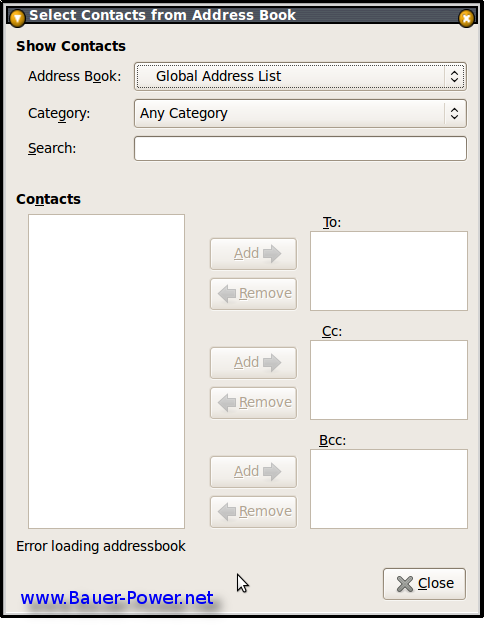


Or I would get this error:
Error Loading Address book.

This address book cannot be opened. This either means that an incorrect URI was entered, or the server is unreachable.
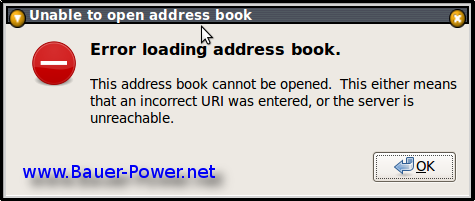

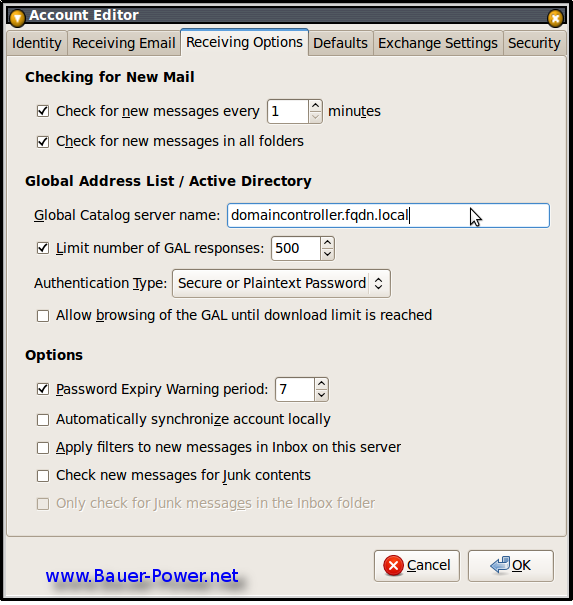
It was my fault though, I mistakenly thought that I should be putting in the FQDN of the Exchange server were you input the URI for the Global Catalog Server. I also read somewhere that you are supposed to put the URL of the OWA server. None of those worked. What did work though was putting in the FQDN of the local Domain Controller!

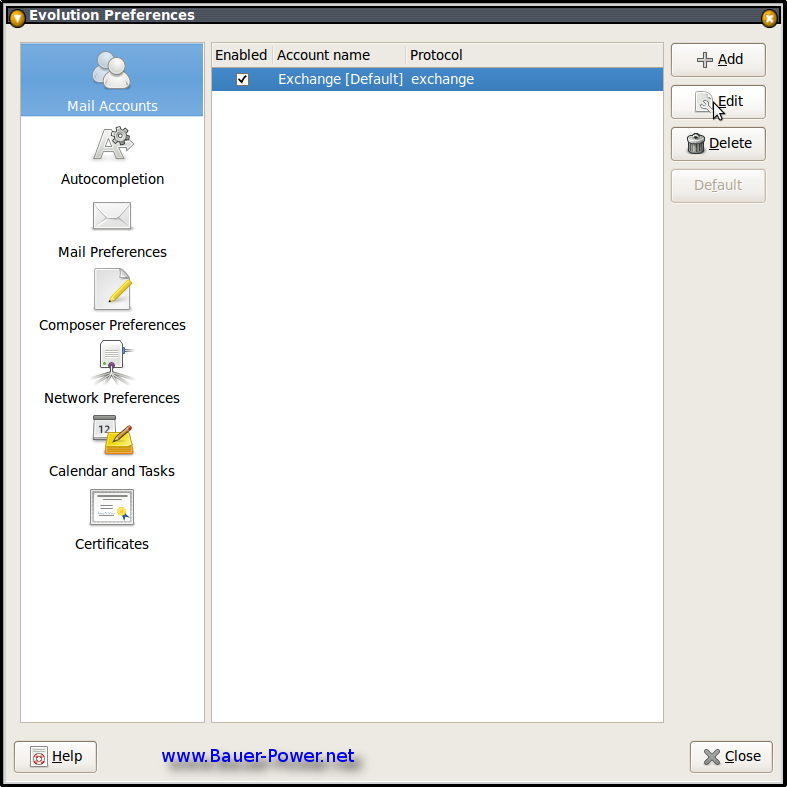
If you don't know where to do that, click on Edit > Preferences. Select your Exchange account and press the Edit button.


Click on the Receiving Options Tab, and under Global Catalog Server Name, input the FQDN of your local Domain Controller then click OK. You will have to restart Evolution for the changes to take effect.


After I did that, I was able to access the GAL, and grab contacts straight from Active Directory!

Now I believe this only works behind the corporate firewall. I am not quite sure what to do if you are wanting to access Exchange email from home on your Linux box. If you have gotten the GAL to open from outside of the network, hit me up in the comments to let me know what you did!

Nov 2, 2008

Why Exchange is still better than Zimbra: A response from a Bauer-Power reader

A few months ago I re-posted an article that the Slothman over at AskTheAdmin wrote. It was on the relatively new open source alternative to Microsoft Exchange called Zimbra. Friday I brought that article to the top, and that sparked an interesting rebuttal from Bauer-Power reader William Lefkovics.

Instead of keeping his ideas secluded in the comments section of that post, I though I would re-post his rebuttal here. Without further ado, here is William's rebuttal to the Slothman:

Wow. There is so much misinformation there, I don't know where to start. First, I love Zimbra (at least up until their sale to Yahoo! which still has lingering merger issues with Microsoft and AOL). I started with ZCS 3.0 and support 5.0 today.

The free version of Zimbra does not have all the features of the commercial Network version, and is not even a competitor to Exchange. The Network version of Zimbra is $35/user per year. It is a subscription license. If you run it on Red Hat Enterprise Linux, also a subscription license, the costs compare to Exchange 2007 on Windows 2003 in about the 4th year.

Please explain how Microsoft Exchange is "notably vulnerable to attacks and viruses". I have never heard of an Exchange virus, but I have only been running Exchange for 10 years (and Zimbra for 2 1/2). It is a messaging system, so it will transport viruses through SMTP messages, just like Zimbra, Scalix, Cisco PostPath, OpenXChange, Axigen, Domino, Oracle Collaboration Suite, SendMail, etc without proper anti-virus mechanisms applied somewhere.

Exchange is not as scalable as other solutions? Ever try Zimbra with 1000 users with the Outlook connectors? Back in Exchange 2003, Korea.com has 6 million users with 150,000 users per Exchange Server (low concurrency and IMAP connected). Walmart, US Dept of Defense... hundreds of thousands of Exchange mailboxes. It is scalable.

1000 Zimbra users on an old box with 1 GB of RAM? Have you tried that? With the Network version with the Archiving module, Zimbra Mobile, Outlook connector, etc? Web administration is an option on many messaging solutions. They all tend to be limited. I actually use the Zimbra CLI over SSH rather than the slow, poorly designed Web admin UI.

Yes, Exchange is a beefy solution. It needs and uses resources. I am not sure why that is a bad thing. It doesn't take any more administrative effort than alternatives like Zimbra. They all require backups, reporting, user administration, etc.

Zimbra and Scalix are not, and never have been, "Exchange Killers". They are, however, Exchange competitors. They offer great alternatives to enterprises comfortable with administering messaging solutions on Linux. And they are solid products. And so is Exchange Server.


Great feedback William! Does anyone have anything to add to William's ideas? Anyone disagree. I want to hear from you in the comments!

Sep 24, 2008

Is the new Android phone from T-Mobile worth it?

The word is out on the streets. The first Open Source, Google based Android phone hit the market running in the United States Monday as T-Mobile announced the release at a press conference in New York. You can watch the press conference here: (Tmobile G1 Launch)

I was very excited to hear about the news. After all I am a huge fan of Open Source, and Android seems like a pretty cool platform to bring Open Source mobile software to the forefront. However, there two key features I look for when shopping for a PDA phone:

  1. Microsoft Exchange Support
  2. The ability to sync with Outlook

Sure surfing the net via handheld is pretty cool and useful, but when I carry around a nerd sized phone, it had better keep me up to date on my business emails, and calendar of events.

Here is a list of the features [Via Engadget]:

  • Tmobile G1 AndroidHSDPA 1700 / 2100 plus quadband EDGE
  • WiFi
  • 3D graphics acceleration
  • 1GB integrated storage plus microSD expansion
  • 3-megapixel camera
  • Android Market for on-device app purchases
  • Amazon MP3 app for on-device music purchases
  • Push Gmail support with full HTML client
  • Bluetooth (but no A2DP)
  • Google Maps with Street View
  • No Microsoft Exchange support
  • No desktop synchronization -- it all happens over the air


Still though, maybe I am being too harsh. For $179, this is probably one of the most affordable out there for the average consumer. I think I might try to talk my wife into getting one, but it might be a hard sell without Outlook support. Sure she uses Gmail, and the Google calendar sync, but that still does not sync all of her calendar info, and don't get me started with contacts.

What's your take? Are you going out to get a G1? Do you know someone who has one yet? Hit me up in the comments.


Twitter Delicious Facebook Digg Stumbleupon Favorites More

 
Design by Free WordPress Themes | Bloggerized by Lasantha - Premium Blogger Themes | stopping spam